Someone cooking at home wants a jar or two and a simple checkout.
Case study · E-commerce
Verda Spice: one website for shoppers and for the trade
Single-origin, organic Kerala spices, sold two ways from one system. Shoppers buy from one jar. Approved businesses see their own price list and order in bulk. The team runs it all from an admin they use every day.
- Client
- Verda Spice Ltd
- What we built
- Online shop, trade ordering area, admin panel, email system
- Platform
- Cloudflare (Workers, D1, R2), React
- Live site
- verda-spice.molvernlabs.workers.dev
The brief
Two very different customers. One website that treats both well.
Verda Spice sells whole spices from small farms in Kerala: black pepper, green cardamom, whole nutmeg and mace. Two very different kinds of customer buy them.
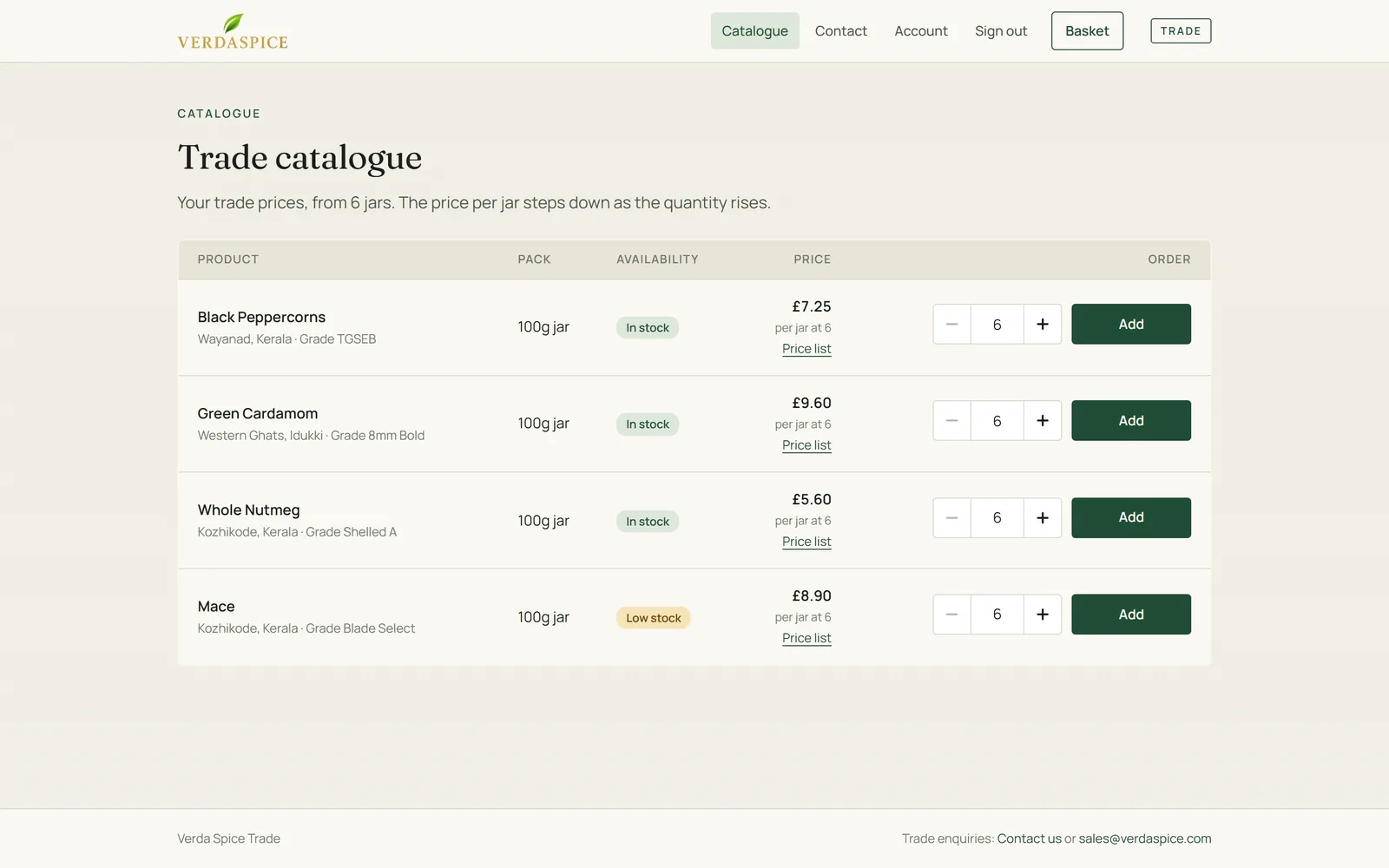
A restaurant, deli or food maker wants a proper price list, bigger quantities, a purchase order number and a VAT invoice.
They needed one website that treats both well, a way to run the business without a developer, and a brand that feels like the product: calm, rooted, and a little bit precious.
What we built
Three connected pieces, one database.
One codebase family and one database, with a fast API, an email system that keeps customers and the team informed, and hosting with no servers to look after.
For consumers
The shop
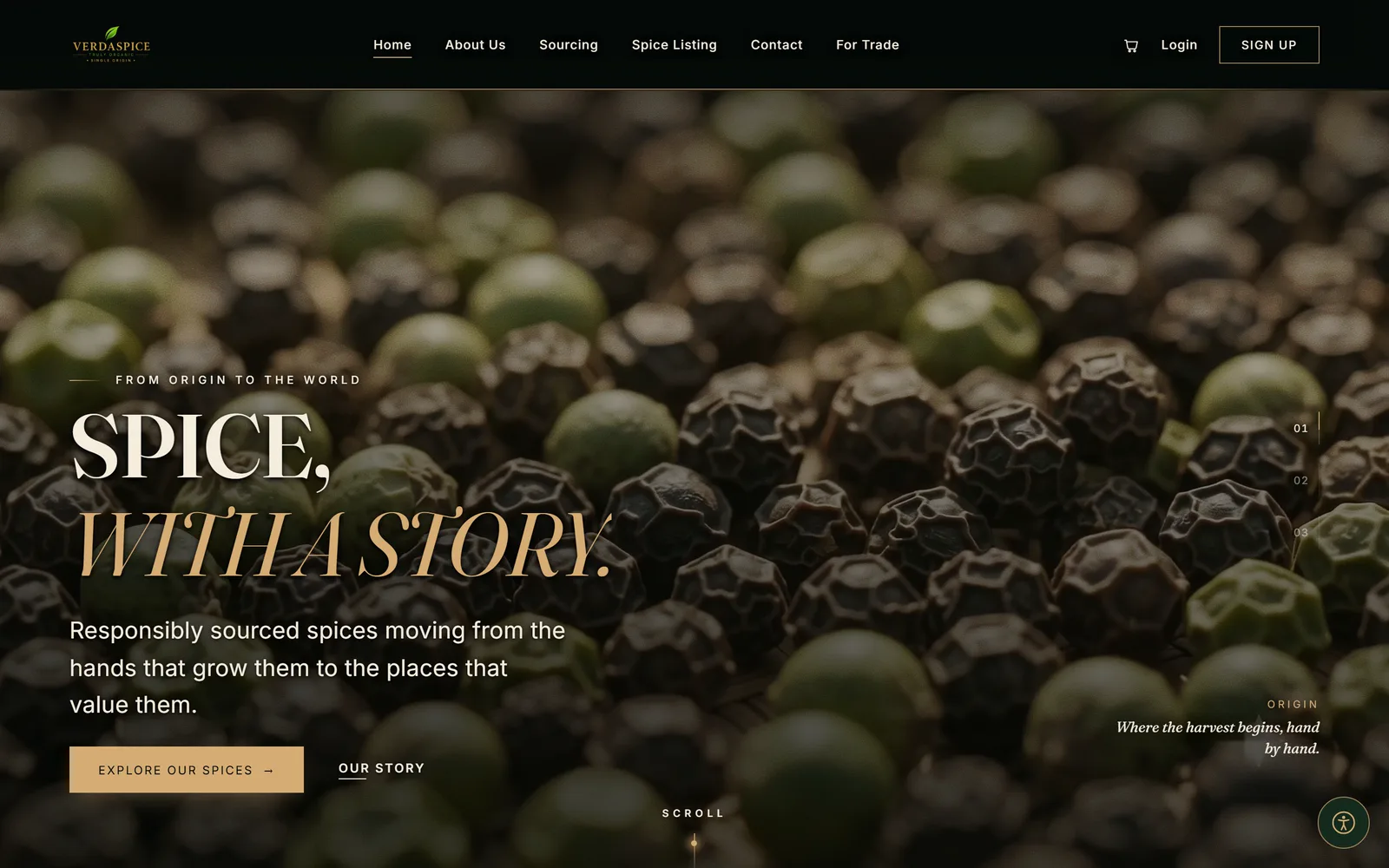
A dark, editorial storefront that lets the spice do the talking.
-
Made to feel like the product.
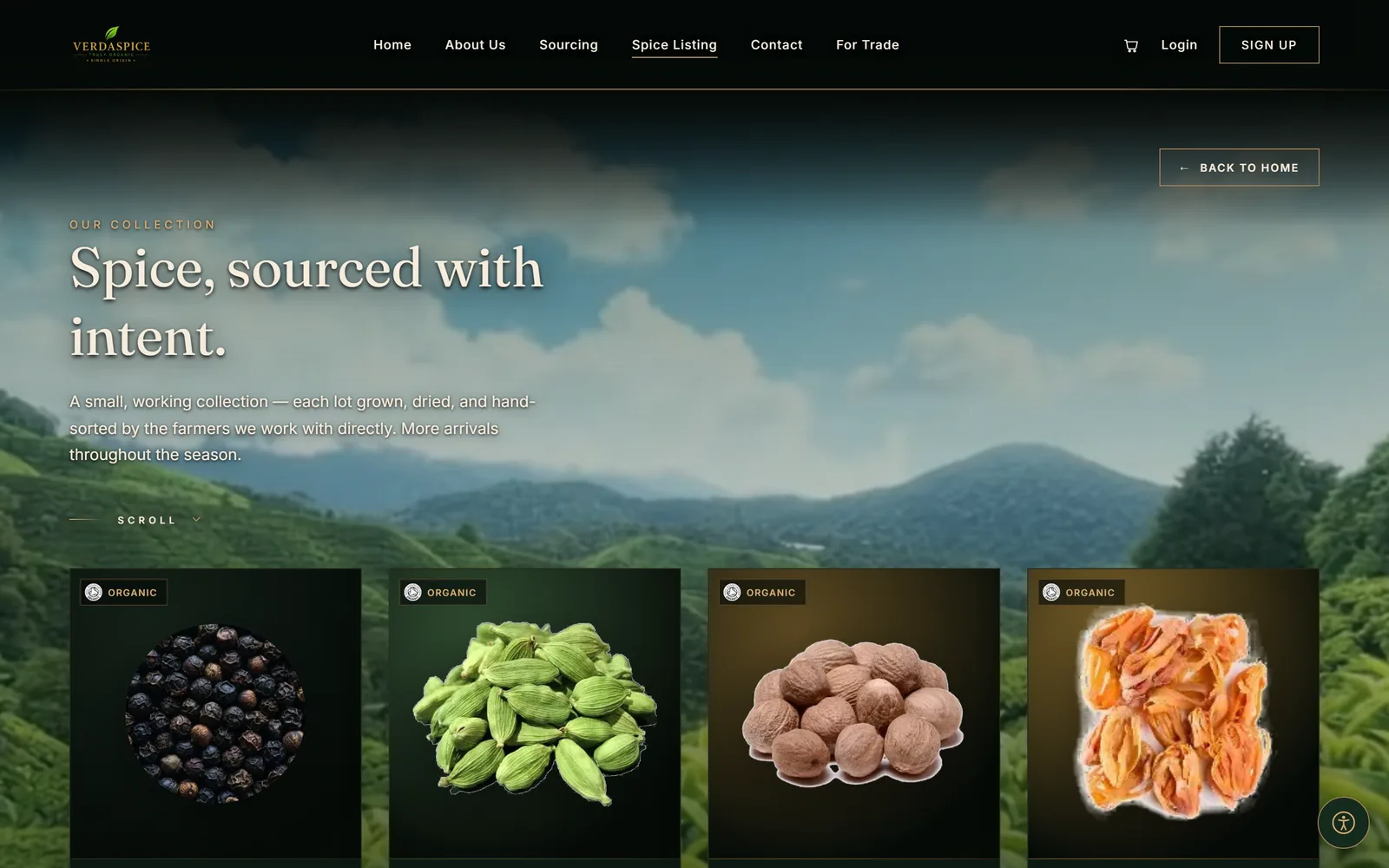
A film-led home page, a plantation film behind the collection, smooth page transitions and a considered type scale. On devices that support it, a soft cursor and subtle parallax. It all switches off for anyone who prefers reduced motion.
-
Buy more, save more.
Each spice page shows its price breaks and highlights the one you are on as you change the quantity.
-
A basket that does the sums.
Delivery, VAT and any discount are worked out by the server, so the price you see is the price you pay. Everything can be saved for later.
-
Discount codes with clear answers.
A code is applied with a click, and if it can’t be used the customer is told why (a minimum order, an expired code) rather than just “invalid”.
-
Check out as a guest, or keep an account.
Accounts have no password to forget: customers sign in with a six-digit code sent to their email.
-
Follow your order.
Anyone can track an order with its number and email address and see it move through Preparing, Dispatched, On its way and Delivered, with the carrier and tracking note. Signed-in customers get their full history, a VAT invoice for each order, and a one-click “order again”.
-
Honest stock.
“Low stock” and “Out of stock” show on the product, and the last jar can only be bought once.
More of the shop
Open to everyone
A built-in accessibility panel lets every visitor tune the site to how they read: light or dark theme, three text sizes, text alignment, a dyslexia-friendly font, high contrast, highlighted links, and options to stop text animation or all motion. The film backdrop can be swapped for a plain background. Choices are remembered between visits.
Also in the shop
- A story told properly: About, Sourcing and Our Farmers sections, with a 3D farmers carousel (and a flat 2D version for anyone who wants it).
- A contact page, and a newsletter sign-up that asks for explicit consent and puts a working unsubscribe link in every email.
- Per-page titles and descriptions, a sitemap and a social sharing card, so the site is ready to be found.
For approved businesses
The trade area
Trade buyers get their own area at /trade, with its own header, footer and a clean paper-and-ink look. It is deliberately a different place from the consumer shop, and it is kept out of search results.
-
Apply online.
A business fills in a short application and confirms its email with a code. The team then approves it from the admin (or, if they prefer, new accounts can be approved automatically with one switch). The business is emailed either way.
-
Prices stay private until approved.
The trade price list is only sent to approved accounts, and that is decided on the server. A shopper can’t see it by looking at the page.
-
A real price ladder.
From six jars, in steps of six, with the price per jar stepping down as the quantity rises.
-
Ordering like a business.
An optional PO number, trade pricing shown excluding VAT with the VAT worked out at checkout, its own delivery rules, a VAT invoice for each order, and reorder in one click.
-
Talk to a person.
A trade contact form sits alongside email and WhatsApp, and messages land in the same inbox as everything else.
The same catalogue, two views
Signed out, the catalogue shows the range but never the prices. Once a business is approved, the same page shows its own price ladder.
Signed out
Approved
For the Verda Spice team
The admin
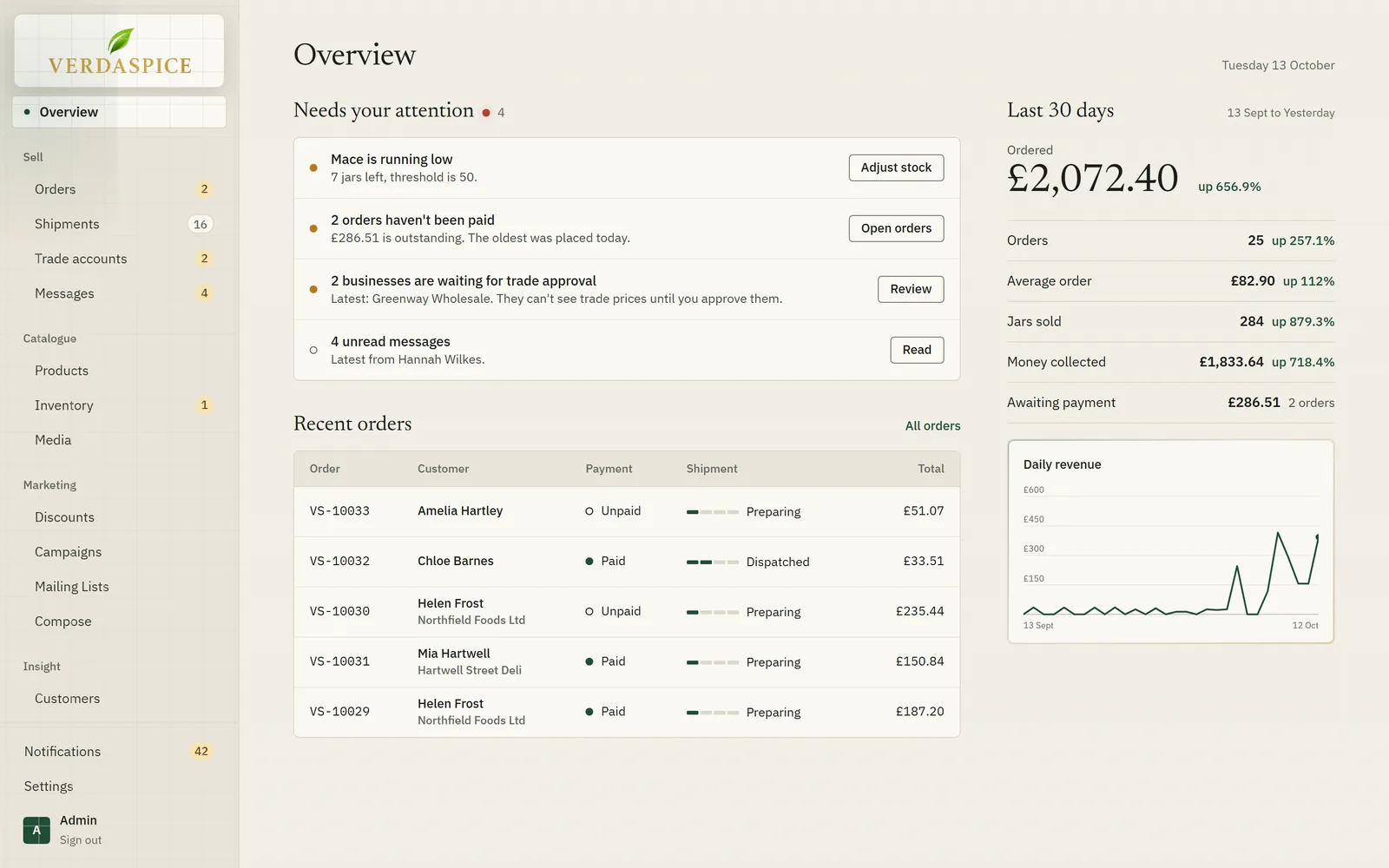
The part of the project the team lives in. It is built to be calm and quick, and to tell you what to do next.
A day-start overview.
“Needs your attention” lists the things that matter: stock running low, unpaid orders, businesses waiting for approval, unread messages. Beside it, the last 30 days with comparisons.
Every admin screenshot comes from a demo copy with invented data.
Demo data
Inside the admin
Orders.
Search, filter by price list, jump between “awaiting payment” and cancelled, export to CSV. Record payment with a note, cancel with the stock put back, and print a VAT invoice with gapless numbering. Key in a phone order for a customer in a few clicks.
Shipments.
Move an order from Preparing to Dispatched, On its way and Delivered, add the carrier and a tracking note, and the customer is emailed at each step.
Trade accounts and messages.
A queue of applications with the business’s details, to approve or decline with a note that goes to them. Messages from the website’s forms land in one inbox, with an unread count.
Products and inventory.
Both price lists per product, draft and archive states, search-engine fields, and stock changes that always carry a reason, so there is a trail.
Discounts.
Percentage or fixed-amount codes with minimum orders, dates, usage limits and an audience: consumers, businesses, or both.
Campaigns, mailing lists and compose.
Campaigns tie a message to a code; mailing lists let you target groups. Write an email, pick subscribers and lists, see exactly how many people it will reach after de-duplication, and send. Every message carries its own unsubscribe link, and anyone who unsubscribes is respected everywhere.
Customers.
Everyone who has placed an order, grouped by email address, with what they have ordered and spent.
Analytics.
Revenue ex VAT, retail against trade, orders, average order, jars sold, top products and a map of sales by UK postcode area, all compared with the previous period.
The figures in these screenshots are sample data from a demo copy, not results.
Demo data
Demo data
Everything is recorded.
A full activity log and a notification bell for the things worth knowing.
Settings the client owns.
Business details for invoices, delivery fees and VAT (separately for consumers and trade), automatic approval of business accounts, how long unpaid orders are held, and who receives alerts.
Emails
Emails that do their job
Eleven designed emails, in the same voice as the site, keep everyone informed without anyone having to chase.
An order confirmation that says what happens next; a message each time the order is dispatched, on its way and delivered; their sign-in code; and, for businesses, a clear approval or decline.
A new-order email with the customer’s details and a button straight to the order in the admin; contact messages; and alerts when a spice runs low or runs out.
See it work
Two short walkthroughs
Recorded on a demo copy with invented data. Both have on-screen captions, so they work with the sound off.
About 90 seconds
A customer finds a spice, checks out as a guest with a discount code, the team sees the order, records payment and dispatches it with a tracking note, and the customer follows it on the tracking page.
What you will see
- A customer browses the collection
- Price breaks update as the quantity changes
- The basket works out delivery, VAT and discounts
- Guest checkout, with a discount code
- The team sees it straight away
- Record the payment, then dispatch with a tracking note
- The customer follows it, with an email at every step
About 95 seconds
A business finds the trade area, sees that prices are hidden, applies and confirms its email, the team approves it in the admin, the trade price list appears, and the business orders with a PO number and finds the order in its account.
What you will see
- A business finds the trade area
- The catalogue shows the range, but no prices
- It applies, and confirms its email
- The team approves it in the admin
- The trade price list appears
- It orders with a PO number, and finds the order in its account
Under the hood
For the people who like to know how it is built
- Cloudflare Workers
- D1
- R2
- React
- Vite
- Hono
- Zod
- TypeScript
-
Platform
Cloudflare Workers for the shop, the admin and the API, D1 (SQLite) for data, R2 for uploaded images. There are no servers to patch, and a quiet day costs next to nothing.
-
Stack
React and Vite on the front end, Hono, Zod and TypeScript on the API.
-
One price engine
Checkout, quotes and the admin’s phone-order form all use the same code to price an order, so a customer is never quoted one thing and charged another.
-
Prices are decided on the server
Which price list you see depends on your account, never on the browser, and the API doesn’t send a price list to someone who shouldn’t have it.
-
Safe with stock
Stock is taken off in one step when an order is placed, so two people can’t buy the last jar; low and out-of-stock alerts go to the team.
-
Careful by default
Passwordless sign-in with limited attempts, rate limits on every open form, and an API with no public address (the sites reach it privately), so the browser only ever talks to the site it is on.
-
Tidy housekeeping
A daily job cancels unpaid orders after the number of days the client chooses, and puts the stock back.
-
Built to be run by the client
Everything above is editable in the admin without touching code.
Want a shop, a trade portal or an admin that works the way your business does?
Tell us what you sell and who buys it. We’ll show you what that could look like.